
About
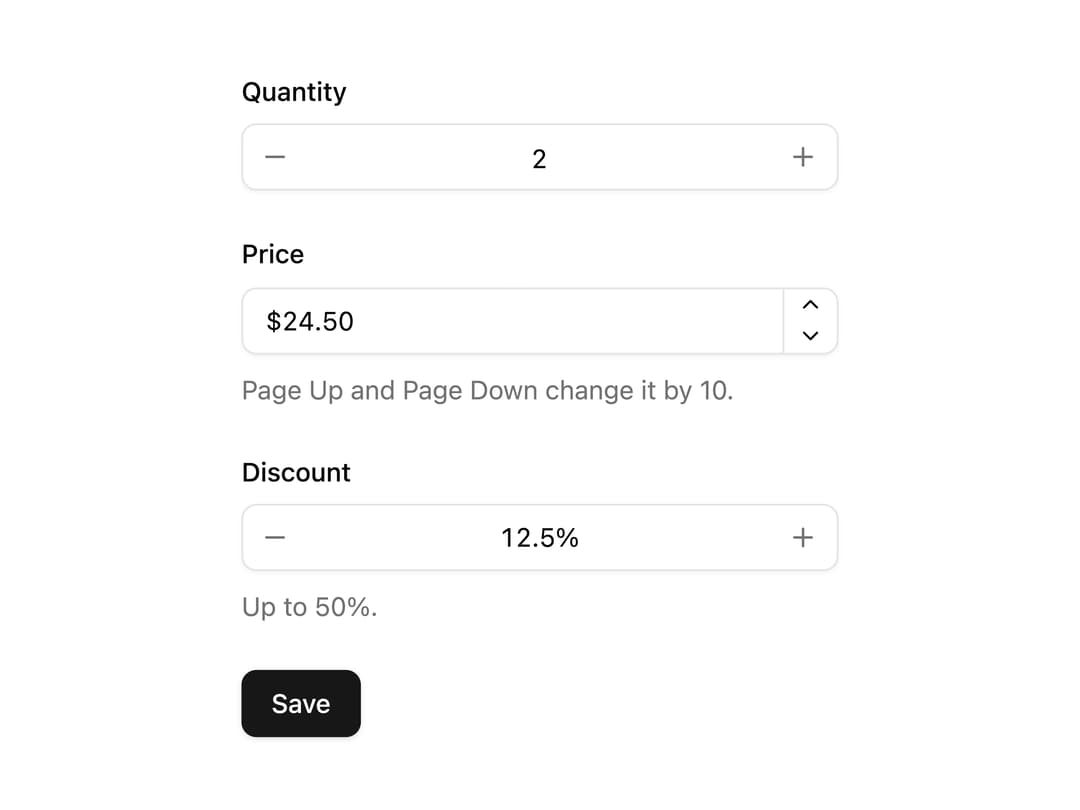
Number input with step buttons, arrow-key and hold-to-repeat stepping, min and max, and Intl formatting for currency, percent or units. Submits the raw number.
Built with React and Tailwind. Copy the prompt and paste it into Claude Code, Cursor or Lovable: your agent adds Number Field to your project and fits it to your theme.
Code
How Number Field is used: the demo's code. The component's own source comes with a free account.
Usage.tsx
"use client";

import * as React from "react";

import { Button } from "@/components/ui/button";
import {
  Field,
  FieldDescription,
  FieldGroup,
  FieldLabel,
} from "@/components/ui/field";
import NumberField, {
  NumberFieldDecrement,
  NumberFieldGroup,
  NumberFieldIncrement,
  NumberFieldInput,
  NumberFieldStepper,
} from "@/components/ui/number-field";

interface Submitted {
  quantity: string;
  price: string;
  discount: string;
}

export default function NumberFieldDemo() {
  const [submitted, setSubmitted] = React.useState<Submitted | null>(null);

  return (
    <form
      className="w-full max-w-xs"
      onSubmit={(e) => {
        e.preventDefault();
        const data = new FormData(e.currentTarget);
        setSubmitted({
          quantity: String(data.get("quantity") ?? ""),
          price: String(data.get("price") ?? ""),
          discount: String(data.get("discount") ?? ""),
        });
      }}
    >
      <FieldGroup className="gap-6">
        <Field className="gap-2">
          <FieldLabel htmlFor="nf-quantity">Quantity</FieldLabel>
          <NumberField
            id="nf-quantity"
            name="quantity"
            defaultValue={2}
            min={1}
            max={20}
            precision={0}
          >
            <NumberFieldGroup>
              <NumberFieldDecrement />
              <NumberFieldInput />
              <NumberFieldIncrement />
            </NumberFieldGroup>
          </NumberField>
        </Field>

        <Field className="gap-2">
          <FieldLabel htmlFor="nf-price">Price</FieldLabel>
          <NumberField
            id="nf-price"
            name="price"
            defaultValue={24.5}
            min={0}
            step={0.5}
            largeStep={10}
            formatOptions={{ style: "currency", currency: "USD" }}
          >
            <NumberFieldGroup>
              <NumberFieldInput />
              <NumberFieldStepper />
            </NumberFieldGroup>
          </NumberField>
          <FieldDescription>
            Page Up and Page Down change it by 10.
          </FieldDescription>
        </Field>

        <Field className="gap-2">
          <FieldLabel htmlFor="nf-discount">Discount</FieldLabel>
          <NumberField
            id="nf-discount"
            name="discount"
            defaultValue={12.5}
            min={0}
            max={50}
            step={0.5}
            largeStep={5}
            formatOptions={{
              style: "unit",
              unit: "percent",
              maximumFractionDigits: 1,
            }}
          >
            <NumberFieldGroup>
              <NumberFieldDecrement />
              <NumberFieldInput />
              <NumberFieldIncrement />
            </NumberFieldGroup>
          </NumberField>
          <FieldDescription>Up to 50%.</FieldDescription>
        </Field>

        <div className="flex flex-col gap-3">
          <Button type="submit" className="w-fit">
            Save
          </Button>
          {submitted && (
            <p className="text-sm text-muted-foreground tabular-nums">
              {`Sent quantity ${submitted.quantity}, price ${submitted.price}, discount ${submitted.discount}`}
            </p>
          )}
        </div>
      </FieldGroup>
    </form>
  );
}
Dependencies
More by Mohammad Shehadeh
View all
Ecommerce Category Page
117
Feature Problem Cards
106
Split Login
103
Feature Grid Spotlight Cards
101
Rounded Top Footer
93
Comparison Section
86
FAQ Two Column
85
Comparison Table
82
More in Forms
View all

Premium Auth
593
Contact Form
28

Form
4

Login 1
70

Book A Demo 1
94

Contact Card
1.1K

HeroUI Field Error
13
Form [react-aria-components]
19

