
About
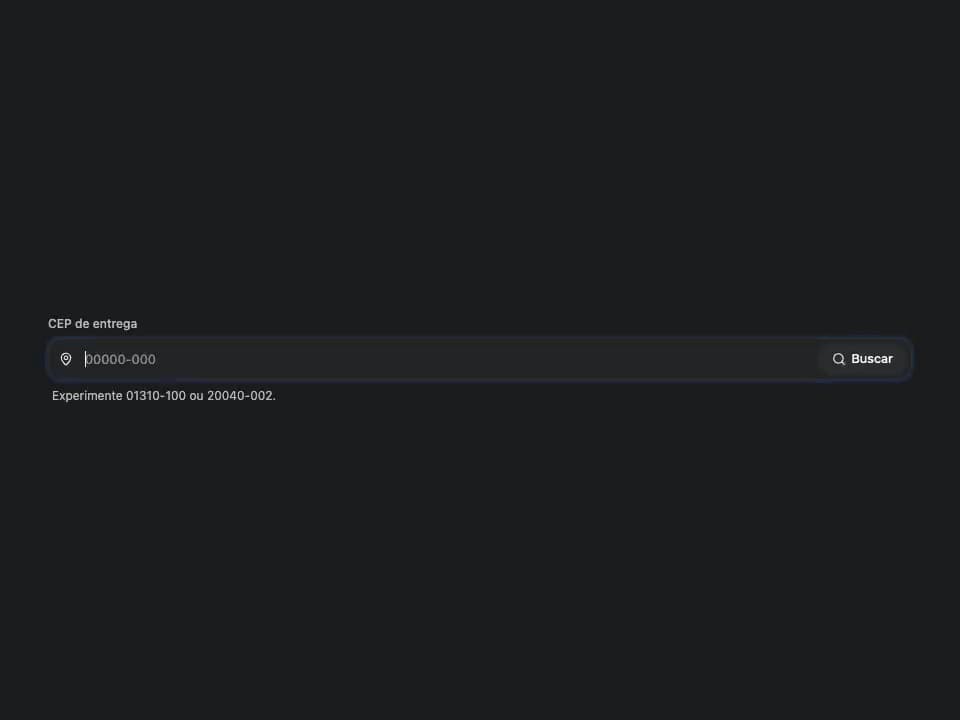
A Brazilian postal code field with masking, address lookup states, and rounded, pill, and compact variants.
Built with React and Tailwind. Copy the prompt and paste it into Claude Code, Cursor or Lovable: your agent adds Uai Blocks CEP Field to your project and fits it to your theme.
Code
How Uai Blocks CEP Field is used: the demo's code. The component's own source comes with a free account.
Usage.tsx
"use client";
import {ThemeProvider as LibraryDemoThemeProvider} from "next-themes";
"use client";

import { useState } from "react";
import {
  CepField,
  CepFieldAddress,
  CepFieldControl,
  CepFieldInput,
  CepFieldLabel,
  CepFieldLookup,
  CepFieldMessage,
  type CepFieldStatus,
  type CepFieldVariant,
} from "@/components/ui/uai-cep-field";

type Address = { street: string; district: string; city: string; state: string };

const addresses: Record<string, Address> = {
  "01310100": {
    street: "Avenida Paulista",
    district: "Bela Vista",
    city: "São Paulo",
    state: "SP",
  },
  "20040002": {
    street: "Rua da Assembleia",
    district: "Centro",
    city: "Rio de Janeiro",
    state: "RJ",
  },
};

export function CepFieldPreview({ variant = "rounded" }: { variant?: CepFieldVariant }) {
  const [status, setStatus] = useState<CepFieldStatus>("idle");
  const [address, setAddress] = useState<Address | null>(null);

  const lookup = (cep: string) => {
    setStatus("loading");
    window.setTimeout(() => {
      const match = addresses[cep];
      setAddress(match ?? null);
      setStatus(match ? "found" : cep === "99999999" ? "error" : "not-found");
    }, 700);
  };

  return (
    <CepField
      variant={variant}
      status={status}
      onValueChange={() => setStatus("idle")}
      onLookup={lookup}
    >
      <CepFieldLabel>CEP de entrega</CepFieldLabel>
      <CepFieldControl>
        <CepFieldInput name="cep" />
        <CepFieldLookup />
      </CepFieldControl>
      <CepFieldMessage>
        {status === "idle" ? "Experimente 01310-100 ou 20040-002." : undefined}
      </CepFieldMessage>
      {address && (
        <CepFieldAddress>
          <span>{address.street}</span>
          <span>
            {address.district}, {address.city} – {address.state}
          </span>
        </CepFieldAddress>
      )}
    </CepField>
  );
}

function SourceSpecimen(){return <CepFieldPreview/>}
export default function LibraryRegistryPreview(){return <LibraryDemoThemeProvider defaultTheme="dark" enableSystem={false}><div data-component-demo data-demo-theme="dark" data-theme="dark" className="dark" style={{background:"var(--background)",color:"var(--foreground)"}}><div className="relative w-full min-w-0 max-w-5xl min-h-[400px] flex items-center justify-center"><SourceSpecimen/></div></div></LibraryDemoThemeProvider>}
Dependencies
More by Victor Mesquita
View all
Data Table Toolbar
10
Uai Blocks Community Feed
5
Cart Drawer
App Sidebar

Filter Bar
Author Card
Contact Section
Audit Log