
About
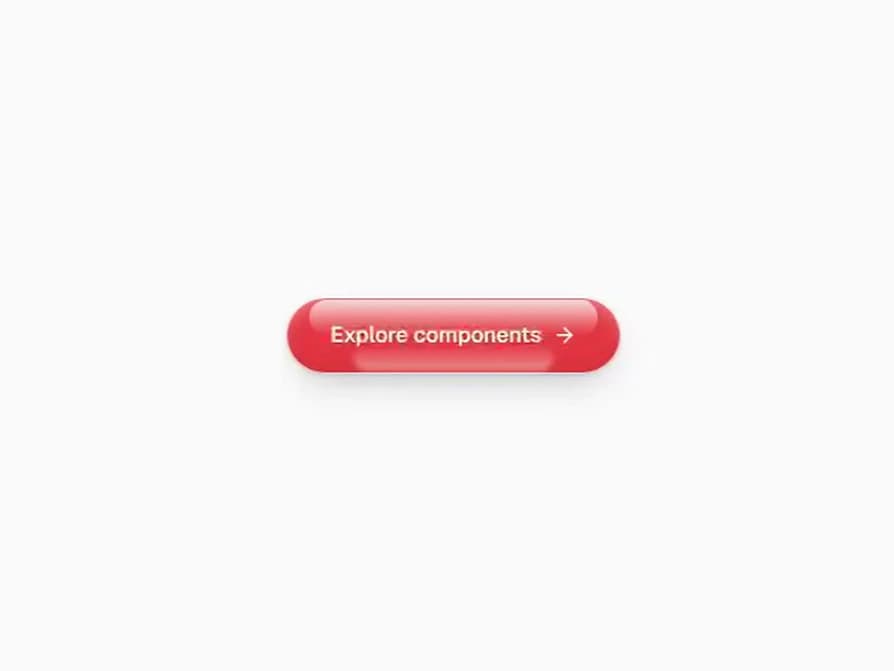
A red glass button that shoots silk threads at the pointer. They leave from the edge facing it, meet at the pointer and spring back when it leaves. Red by default, or any tint, and the label turns black on light glass. On a phone, press and drag out of the button.
Built with React and Tailwind. Copy the prompt and paste it into Claude Code, Cursor or Lovable: your agent adds Web Shot Button to your project and fits it to your theme.
Code
How Web Shot Button is used: the demo's code. The component's own source comes with a free account.
Usage.tsx
import { ArrowRight } from "lucide-react";
import { Component as WebShotButton } from "@/components/ui/web-shot-button";

export default function WebShotButtonDemo() {
  return (
    <div className="flex min-h-[420px] w-full items-center justify-center p-10">
      <WebShotButton>
        Explore components
        <ArrowRight />
      </WebShotButton>
    </div>
  );
}
Dependencies
More by Mohamed Uvaish
View all

Signature Pad
468
Kanban Board
393
Folder Card
384
Share Dialog
319
Charts & KPI Cards
146
Notification Panel
136
Rich Text Editor
66
Command Menu
51
More in Buttons
View all
Button
20

Button
3

Button Group
18

Button
149

Icon Label Subtext Button
69

Button
9

Button
37
Texture Button
113

