
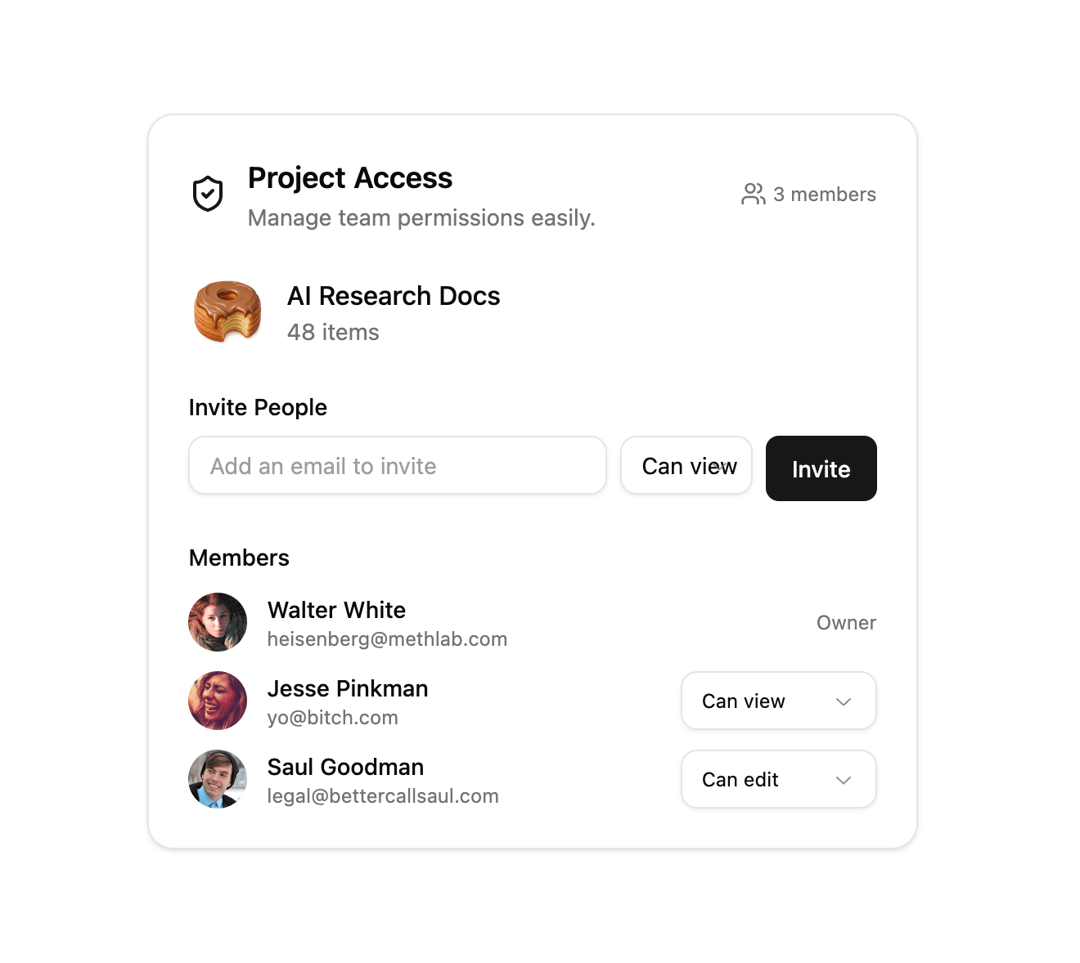
The HealthStatCard component is a beautifully designed, interactive, and reusable UI card built using Shadcn UI and Framer Motion. It is perfect for displaying health, fitness, or performance-related statistics in a visually engaging way. The card features smooth animations, rounded “bubble-style” bars with 3D hover effects, and an optional tooltip that provides detailed information about each data point. You can configure the title, icon, stats, graph data, legend visibility, and even customize tooltip descriptions for each bar. This makes it ideal for use in dashboards, wellness apps, or analytics pages where users can easily visualize and interpret progress trends at a glance.
Built with React and Tailwind. Copy the prompt and paste it into Claude Code, Cursor or Lovable: your agent adds Health Stat Card to your project and fits it to your theme.
Code
How Health Stat Card is used: the demo's code. The component's own source comes with a free account.
Usage.tsx
"use client";

import * as React from "react";
import { AccessManagerCard, Member } from "@/components/ui/health-stat-card";
import { ShieldCheck } from "lucide-react";

const initialMembers: Member[] = [
  {
    id: "1",
    name: "Walter White",
    email: "[email protected]",
    avatar: "https://cdn.21st.dev/assets/mirror/56/5619d988d9e8795f57f23caeac425062a8b972984cbe75e5a3fe3370e4dd60b9.jpg",
    role: "Owner",
  },
  {
    id: "2",
    name: "Jesse Pinkman",
    email: "[email protected]",
    avatar: "https://cdn.21st.dev/assets/mirror/4f/4fcf7f925f8c23881f850d2c242e643915c1141e6e23e8cace997c603267198c.jpg",
    role: "Viewer",
  },
  {
    id: "3",
    name: "Saul Goodman",
    email: "[email protected]",
    avatar: "https://cdn.21st.dev/assets/mirror/9a/9a3f3f88dac2ceb807e98d4cbe99acc9813da6d0ce2859b1cf026747727e1667.jpg",
    role: "Editor",
  },
];

export default function AccessManagerDemo() {
  const [members, setMembers] = React.useState<Member[]>(initialMembers);

  const handleRoleChange = (id: string, newRole: "Viewer" | "Editor") => {
    setMembers((prev) =>
      prev.map((m) => (m.id === id ? { ...m, role: newRole } : m))
    );
    console.log(`${id} changed to ${newRole}`);
  };

  const handleInvite = (email: string, role: "Viewer" | "Editor") => {
    const newMember: Member = {
      id: (members.length + 1).toString(),
      name: email.split("@")[0],
      email,
      avatar: `https://i.pravatar.cc/150?u=${email}`,
      role,
    };
    setMembers((prev) => [...prev, newMember]);
    console.log(`Invited ${email} as ${role}`);
  };

  return (
    <div className="flex h-full min-h-screen items-center justify-center bg-background p-6">
      <AccessManagerCard
        title="Project Access"
        description="Manage team permissions easily."
        folderName="AI Research Docs"
        itemCount={48}
        members={members}
        onInvite={handleInvite}
        onRoleChange={handleRoleChange}
        folderIcon={<ShieldCheck className="h-6 w-6 text-primary" />}
      />
    </div>
  );
}
Dependencies
More by ruhith
View all
LoadingLines
155
LoadingRadar
132
LoadingBottle
125
BarLoader
94
Loader
79
BouncingCirclesLoader
55
LoaderProgressiveBar
52
LoaderGrid
50
More in Cards
View all

Course Design Cards
1.3K

Photo Deck
47
Folded Card
45

Statistics Card 10
304
Statistics Card 2
309
Statistics Card 7
336

CTA Section
6

Liquid Glass Card
198
